728x90
반응형
1. Datatable 생성 및 컬럼 정의
DataTable table = new DataTable();
table.Columns.Add("ID", typeof(int));
table.Columns.Add("Name", typeof(string));
2개의 열이 생성되는 거
2. data 넣어주기
table.Rows.Add(1, "Apple");
table.Rows.Add(2, "Banana");
table.Rows.Add(3, "Cherry");
3. 만든 datatable을 checkedlistboxcontrol 에 바인딩 해주기
checkedListBoxControl1.DataSource = table;
checkedListBoxControl1.DisplayMember = "Name";
checkedListBoxControl1.ValueMember = "ID";
4. 전체 체크 상태로 바꾸기
for (int i = 0; i < checkedListBoxControl1.ItemCount; i++)
{
checkedListBoxControl1.SetItemChecked(i, true);
}
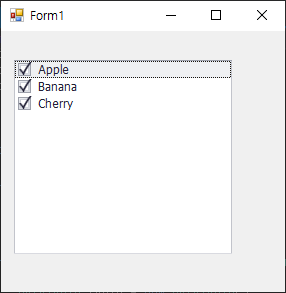
5. 적용 화면
728x90
반응형
'c# > DevExpress' 카테고리의 다른 글
| DevExpress Gridcontrol drag a column header Hide 안 보이게 (0) | 2024.07.25 |
|---|---|
| [C#] DevExpress Chart 처음 사용 시 (1) | 2022.02.09 |
| [c#] DevExpress Chart Legend 오른쪽 위에 네모박스 값 표시 (0) | 2022.02.09 |
| [c#] DevExpress Chart Point Labels 차트 위에 값 표시 (0) | 2022.02.09 |
| [c#] DevExpress Chart Background (0) | 2022.02.09 |